

AI Was Supposed to Kill Consulting. Instead It Has Started a Golden Age.
The Quiet Builders Are Coming. Great Companies Will Build Around Them.
TL → DR
Grok Bot lets you set up a team of AI bots, each with one job, its own instructions, scheduled routines, and access to the tools you connect.
My setup has eight working bots and six group rooms. On a typical weekday it sends me about 24 items, publishes about 28 posts across five platforms, and adds about 57 articles to a research database.
Every public post still waits for my approval. That rule has protected the brand, and it has also made me the slowest part of the system, with 16 to 18 approval prompts a day.
My X bot also runs a video pipeline to four platforms, with 174 posts in Buffer for October 13 to 24.
Below: how the product works, my org chart and architecture, the daily output table, the video pipeline, a six-step build guide, ten prompt templates you can copy, what broke, and what I’m changing next.
Start Here
Two weeks ago I wrote about the org chart of my AI operating team. Several of you asked the same follow-up question: how do I build one?
This piece answers it. It’s the manual I wish I’d had on September 1, when I set up my first bot to keep me out of calendar noise.
Since then the team has grown to eight working bots. They read my paid news subscriptions, draft for X, Substack, and LinkedIn, load posts into Buffer for Facebook, Instagram, and TikTok, prepare me for meetings, and write long-form article drafts I can choose from. I approve everything that goes out under my name.
I’ll show you exactly how it runs, what it produces each day, the instructions I gave each bot, and where it broke. Then I’ll walk you through building your own, one step at a time.
What Grok Bot Is, in Operator Terms
If you’ve run a department, you already understand the model. Here are the parts.
Bots are your hires. Each bot is a role with a name, a job description, and its own memory. You talk to each one in its own chat, just as you’d in a one-on-one with a direct report. I keep each bot to one job. My X bot runs X. My News Bot reads the papers. When a job gets crowded, I hire another bot.
Routines are the standing meetings and recurring tasks. A routine is a scheduled or triggered job: “every weekday at 8:00 AM, check my calendar and only write if something needs a decision.” Routines are what make the team run while you sleep. My News Bot runs five routines a day, starting with a 6:47 AM briefing.
Connectors are the system access you grant. Google Calendar, Gmail, Google Drive, Buffer, X, Supabase, and others. Each bot only uses the ones its job needs. My Chief of Staff reads my calendar and Gmail. My X bot uses the X connector for search and analytics and Buffer for scheduling.
Skills are saved procedures. A skill is a written playbook a bot can follow repeatedly, like an SOP binder. Grok Bot ships with managed skills, and you can save your own. I loaded a whole set of my most used skills from Claude into Grok for this purpose.
Group rooms are cross-functional meetings. A group room puts several bots and you in one chat. My busiest room has the News, X, Substack, and LinkedIn bots. Every morning, the X bot posts what’s trending, the News Bot checks the facts, and the content bots divide the stories so no two platforms use the same line on the same day.
Shared memory is the company file server. Every bot can read and write files on a shared computer. My target lists, voice guides, reply logs, drafts, and briefings all live there. I also keep a Google Drive media folder for images and video, a Great Quotes Library doc, and a Drive folder of article drafts.
The box is the office computer. Each bot works on a real computer with a real web browser. That browser is how bots sign in to sites without a connector. I signed in to Substack, X, LinkedIn, and my paid news subscriptions in the browser once. I typed my passwords into a secure form the bot couldn’t see, and the bot has been working within those sessions since.
The primary bot, also called Grok Bot, works as a front desk. It takes any request and either handles it or routes it to the right specialist.
My System Today
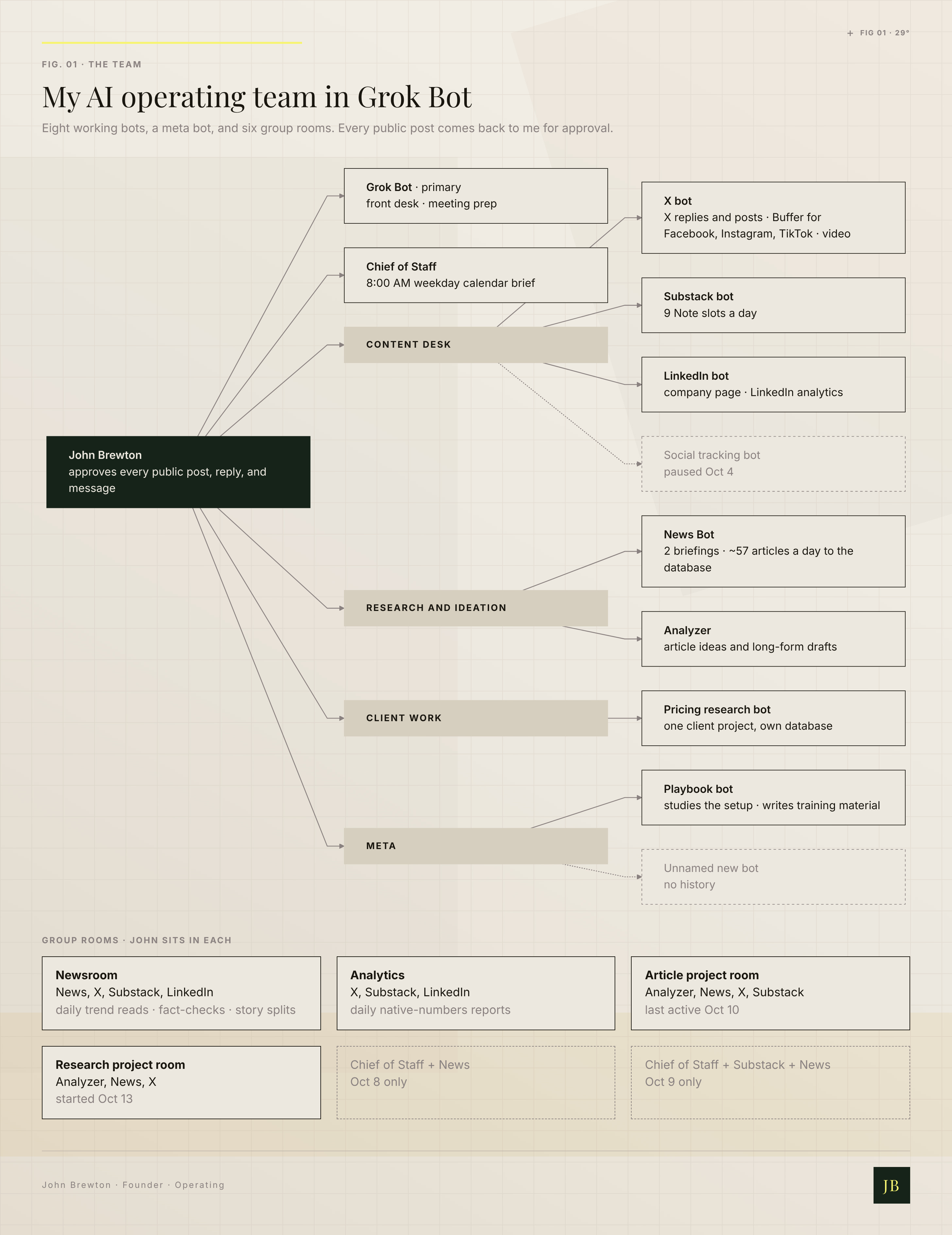
Figure 1. The team: eight working bots, a meta bot, and six group rooms, with every public post coming back to me.
